Modern
Running a Home-Based Business? Why Your Electrical Service May Need an Upgrade
By Timely Updates
November 20, 2026
Field Notes
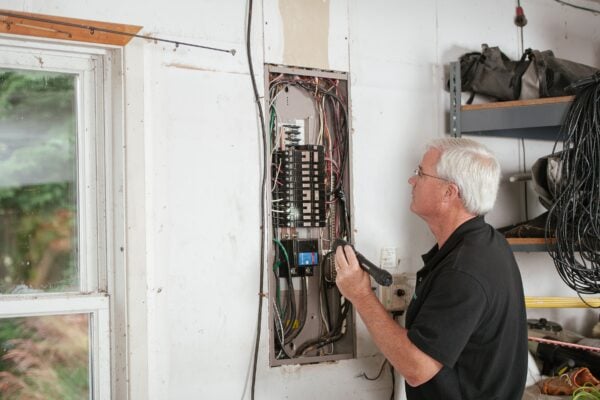
Working from home used to mean a laptop on the kitchen table. Today it can mean a full home office, a production studio in the garage, a workshop in the basement, or a spare room packed with inventory and equipment. Every addition draws power, and most houses were wired long before anyone planned to run a business inside them.
When the load grows past what the house can supply, the symptoms show up fast: tripped breakers, flickering lights, and equipment shutting off mid-project. An electrical service upgrade can solve the problem at its source, and planning it early keeps your business running while the work gets done. Here is what to look for, what the work involves, and how to prepare.
Why Home Businesses Strain a Home’s Electrical Service
Homes are designed around typical household use: lighting, appliances, entertainment, and heating and cooling. A business adds a second layer of demand on top of that, and it often runs for long stretches of the day instead of in short bursts.
Common sources of extra load include:
- Computers, monitors, and networking equipment running all day
- Power tools, compressors, or other motorized equipment in a garage or basement
- Extra air conditioning or space heaters to keep a work area comfortable
- Printers, kilns, ovens, or other equipment that produces heat
- Studio lighting, audio gear, and rows of charging stations
The real problem is overlap. A space heater, a clothes dryer, and a piece of workshop equipment might each be fine alone. Run together, they all pull from the same main service, and that is when an older home starts to struggle.
Warning Signs Your Home’s Electrical Service Is Maxed Out
Most people do not think about electrical capacity until something goes wrong. Catching early signs lets you act before a failure interrupts a deadline or damages equipment.
- Breakers that trip regularly when several devices run at the same time
- Lights that dim or flicker when a large appliance or tool starts up
- Extension cords and power strips used as permanent solutions
- A breaker panel with no open slots left for new circuits
- Outlets or switch plates that feel warm to the touch
- Buzzing or crackling sounds near the panel
- An older home with original wiring and few updates
Burning smells, scorched outlets, or a hot panel are safety issues, not planning issues. If you notice them, stop using the affected circuits and contact a licensed professional right away.
Even if none of these signs show up today, growth changes the math. A setup that works for a solo operation may struggle once you add equipment, a second workstation, or a part-time helper.
What an Electrical Service Upgrade Involves
An electrical service upgrade increases the amount of power that can safely enter and move through your home. It usually centers on the equipment where utility power connects to the house: the service entrance, the meter, and the main panel. Depending on the home, it may also include new wiring, replacing an aging panel, or adding dedicated circuits for equipment that needs its own line.
Think of it like the water line feeding a house. You can add more faucets, but if the supply line is too small, pressure drops everywhere. Electrical capacity works the same way. Adding equipment inside the home does not help if the supply coming in is already maxed out.
A few terms are useful to know before you talk to anyone:
- Service capacity: the total amount of power the home’s main connection is rated to handle.
- Load: the combined demand from everything running at once.
- Panel space: the physical room left in the breaker panel for new circuits.
- Dedicated circuit: a circuit that serves a single piece of equipment so it does not compete with other devices.
This is not a DIY project. The work happens at the point where utility power meets your home, and mistakes can cause fires, equipment damage, or injury.
How to Plan the Upgrade Without Losing Work Time
A little preparation keeps the project from turning into a week of lost income. Work through these steps before anyone picks up a tool.
Map your current and future power needs
Write down every major piece of equipment you use for work, plus anything you plan to add in the next few years. Many manufacturers list power requirements on spec sheets or labels, so check those or ask the supplier. Upgrading once with future growth in mind is usually less disruptive than upgrading twice.
Bring in a licensed professional early
A licensed professional can inspect your current setup, measure your existing load, and tell you what the home can actually support. Ask whether the current service is large enough, whether the panel is in good condition, whether the existing wiring suits the new loads, and what permits and inspections the project will need. Permit rules vary by location, so ask what applies in your area rather than assuming.
Plan around the outage
Service work usually requires coordination with the local utility, which may need to disconnect and reconnect power. That can mean a planned outage for part of a day or longer. Back up your files, charge your devices, and schedule the work away from major deadlines or client calls. If you rent, talk with your landlord first, since they may need to approve the work.
Budget with a buffer
Costs depend on the home, the size of the change, the condition of existing equipment, and local requirements, so treat any figure you find online as a rough guess. Ask for a written estimate after an on-site assessment, and ask what it includes, such as permits, inspection fees, and repairs to walls or finishes afterward. Older homes sometimes reveal surprises once panels or walls are opened, so leave room in both money and time.
Make Electrical Capacity Part of Your Business Plan
Electrical capacity rarely gets attention until it fails, but it quietly decides how far a home-based business can grow. Treating it as a planning item, alongside equipment purchases and hiring, keeps your work from stalling over something that could have been caught early.
It is also worth asking your insurance provider whether business equipment at home affects your coverage. Map your needs, bring in a licensed professional before work gets scheduled, and give yourself a buffer on budget and timeline. A little planning now can save you from emergency fixes, lost work, and rushed decisions later.