BlackBerry Bold Sticky Keys? Simple Fixes Here
By allvenue
November 14, 2026
Field Notes
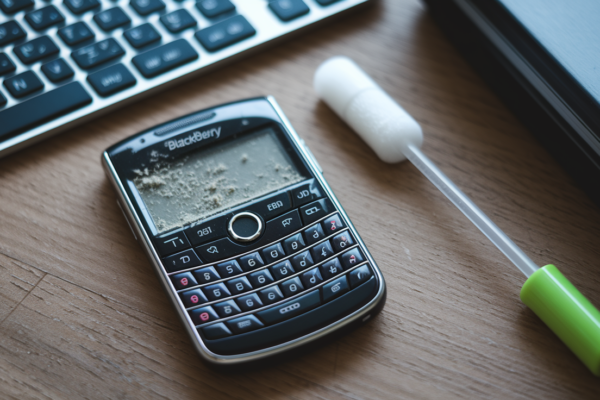
Most people assume a sticky BlackBerry Bold key means the whole keyboard needs replacing.
But on models like the 9000, 9700, 9780, 9900 and 9930 it’s usually debris, sugary residue, or a software glitch.
This guide gives a seven-step checklist you can run through safely at home.
You’ll test every affected key, try compressed air and isopropyl cleaning, run diagnostics, and only reach for deeper disassembly if needed.
Follow it and you’ll often fix the problem in under 30 minutes and avoid an unnecessary repair.
Fast Fixes for Sticky or Unresponsive BlackBerry Bold Keys

A sticky key feels slow or gummy under your finger but it usually still moves. A jammed key gets physically stuck down or barely travels at all. A non responsive key moves fine but doesn’t register a letter, or it fires twice when you meant to press it once. Most of the time, if the problem’s limited to one or two keys, it’s debris or residue, not a broken keyboard assembly. You can fix it at home without replacing anything.
Before grabbing cleaning supplies, work through this checklist in order. Each step points to the full procedure later in this guide, so skip ahead once you know what applies to your BlackBerry Bold.
- Test and record every affected key, then check the diagnostic cause table in the next section.
- Complete the preparation and power safety checklist before touching the keyboard.
- Inspect for loose debris and follow the compressed air cleaning procedure.
- Use the isopropyl cleaning procedure if keys still feel gummy after air cleaning.
- Run the software diagnostic and reset sequence if the key moves normally but input is wrong.
- Consider under key cleaning only after the lower risk methods above have failed.
- Move to deeper diagnostics, professional repair, or replacement if the keyboard’s still misbehaving.
Printable checklist: save or screenshot these seven stages, check them off as you go, and note which keys still misbehave after each stage. This becomes your record if you eventually need professional repair.
Image suggestion: a close up triptych comparing a sticky key (visible residue around the edges), a physically damaged key (cracked cap or sitting crooked), and a normal key for reference.
What Causes BlackBerry Bold Keyboard Keys to Stick?
(((alt-img2)))
A key can misbehave for physical, electrical, or software reasons. Telling them apart saves you from tearing into a keyboard that didn’t need it. Dust and crumbs usually show up as flaky bits wedged in the gaps around a key, and they tend to make movement feel gritty rather than smooth. Sugary residue from drinks or snacks, plus natural skin oils, often creates that gummy, slow return feel readers usually mean when they say “sticky.” Liquid corrosion is different and more serious, showing up as green or brown marks on contacts after a spill, even an old one you may have forgotten about. Mechanical wear, like a flattened rubber dome or a cracked key post, tends to show up as rough or uneven travel, or a key that stays pressed down. Here’s the quick rule: if a key feels rough or stays depressed, suspect contamination or wear. If the key moves normally but the input is delayed, missing, or wrong, that points toward an electrical or software issue instead.
| Symptom | Likely Cause | First Action | Repair Level |
|---|---|---|---|
| Gritty movement | Dust or crumbs in the key gaps | Compressed air cleaning | Low |
| Gummy, slow return movement | Sugary residue or skin oils | Isopropyl alcohol spot cleaning | Low to medium |
| Key stays depressed | Damaged post, retainer, or membrane | Keycap removal and inspection | Medium |
| Normal movement, no input | Contact, flex cable, or software fault | Software diagnostics, then cable check | Medium to high |
| Entire row fails | Ribbon connector, keyboard matrix, or PCB fault | Deeper disassembly and cable inspection | High |
| Green or brown deposits | Liquid corrosion | Stop and assess for professional cleaning | High |
Safe Preparation for BlackBerry Bold Keyboard Cleaning
(((alt-img3)))
Power, Data, and Component Safety
Turn the phone off and remove the battery before you introduce compressed air, alcohol, brushes, or any tool to the keyboard. Wait at least 10 seconds after pulling the battery before you start work. This gives internal components time to fully discharge.
Remove the SIM and memory card before any disassembly, and back up your data before a security wipe, OS reload, or deeper repair. Work on a clean, well lit, static safe surface, and consider an anti static wrist strap if you’re going beyond surface cleaning.
Document the Model, Layout, and Parts
Confirm your exact BlackBerry Bold model before removing a single keycap or screw. The 9000, 9700, 9780, 9900, and 9930 all use different key mounts, housings, screw patterns, and internal connectors. Mixing up instructions between them is one of the easiest ways to damage something that was working fine.
Photograph the keyboard before you start, map out where each screw came from, label any removed parts, and use a light coloured tray so small components don’t disappear. Never mix parts between keys or models, even if they look interchangeable at a glance.
BlackBerry Bold Cleaning and Repair Tools
| Tool or Supply | Purpose | Typical Cost |
|---|---|---|
| Compressed air can | Dislodging loose dust and crumbs | $5 |
Final Words
In the action, you tested affected keys, completed the prep checklist, used compressed air and isopropyl cleaning, and escalated to under-key lift, housing checks, or software resets as needed.
The guide’s timing estimates, photos, and printable checklists are designed to keep the repair low-risk and efficient so you don’t jump to teardown or replacement unnecessarily.
Use the printable checklist for blackberry bold keyboard sticky keys troubleshooting. Back up data, confirm your model, and stop if a repair feels risky. Most issues respond to careful cleaning and testing. Take it slow and you’ll likely restore smooth Bold typing.
FAQ
Q: What to do if your keyboard keys are sticky?
A: If your keyboard keys are sticky, test and note affected keys, power off and remove the battery, try compressed air first, use 90–99% isopropyl swabs for gummy residue, then consider keycap removal or professional repair.
Q: Can I use the BlackBerry keyboard on my Android device?
A: You can use a BlackBerry-style keyboard on Android by installing a compatible keyboard app or pairing a BlackBerry Bluetooth keyboard; expect layout and feature differences and grant necessary keyboard permissions.
Q: How do I get my keyboard out of lock mode?
A: To get your keyboard out of lock mode, unlock using the device’s physical lock or on-screen unlock control, check Settings under Keyboard or Security, and power-cycle or soft-reset if the lock persists.
Q: Why is my keyboard not typing all of a sudden?
A: Your keyboard not typing suddenly can mean physical contamination, broken key posts, a loose flex cable, or software/configuration issues; test key movement, run software diagnostics, back up data, then escalate to hardware checks.